

We made a few tweaks to the dashboard to make the most important information easy to find, quickly.
Let’s dive in!
Dashboard updates
When you first sign in, you will see all “completed” forms for your organization:
Why did we make this update?
Completed forms are the goal, so we made that the first thing you see.
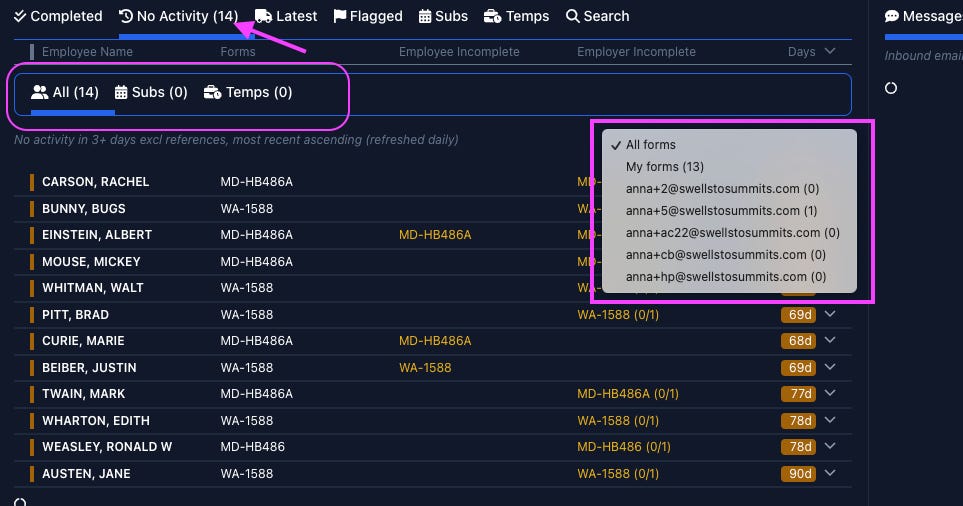
The second tab on the dashboard will take you to forms with "No Activity” - i.e. any form where no action has been taken for 3 days in the last 90 days. These are forms that may require your attention for additional follow-ups or edits.
See counts on “No Activity” view
The “No Activity” tab will now display the number of records, and when you select the drop down to see the records created by other users, each user will have the specific count listed by their name
Why did we make this update?
To help your team stay on top of any forms with an “at a glance” way to quickly gauge how many forms need your attention.
Sort by “created by”
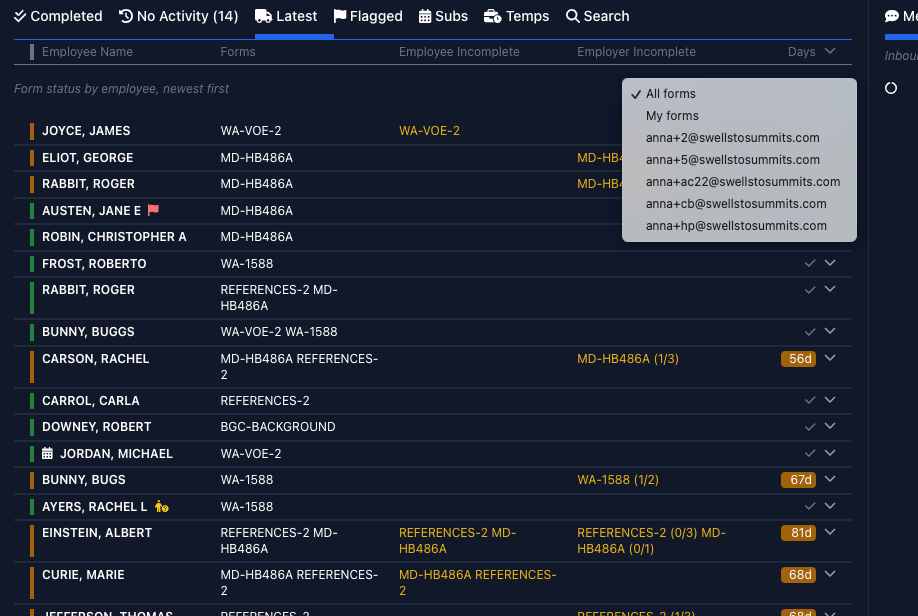
Previously only admins could sort by user, but now everyone will have that option. By default you will see “all forms”, but you can filter to see forms created by you or specify another user on the “No Activity” or “Latest” views by selecting their name from the drop-down menu.
Why did we make this update?
There are many scenarios where sorting by “created by” make sense, from seeing progress on what’s yours to managers needing to get a pulse on their team’s workload.
Access to completed forms locked-down
3 days after completing a form, the user will lose access to make edits. If any changes need to be made by the employee or signer, you can reopen the form and a new link will be sent for them to complete the form again.
Why did we make this update?
We took this measure to enhance security and data privacy.
That’s it for this month. If you have any questions, please reach out to anna @robinform.com